🚀 Early Bird Sale — Get FrameLoc at 50% off.
Only
left!
🚀 Early Bird Sale — Get FrameLoc at 50% off.
Only
left!
🚀 Early Bird Sale — Get FrameLoc at 50% off.
Only
left!
The Framer localization plugin
Translate your Framer site into unlimited languages
Translate your Framer site into unlimited languages
FrameLoc translates your pages, CMS items and components into as many languages as you want, right inside Framer. Every translation stays in your project, with no monthly fee and no per-language cost. Pay once, keep it for life.
Translate pages, CMS and components, keep everything in your project. Pay once.
Pay once. Made for Framer.

Inside the plugin
From first language to live site in minutes.
From first language
to live site in minutes.
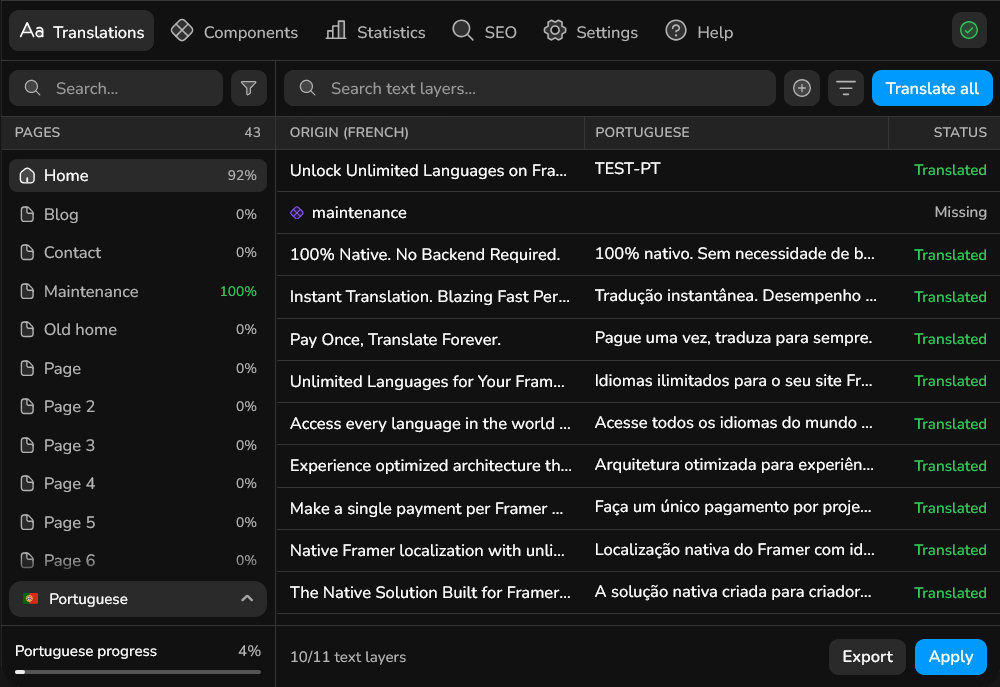
Translate every text in one editor
Pages, CMS items and components are read from your project and listed together, ready to translate.

Translate with the AI you already use

Review every text side by side

Translate every text in one editor
Pages, CMS items and components are read from your project and listed together, ready to translate.
Translate with the AI you already use
Review every text side by side
Translate every text in one editor
Pages, CMS items and components are read from your project and listed together, ready to translate.
Translate with the AI you already use
Review every text side by side
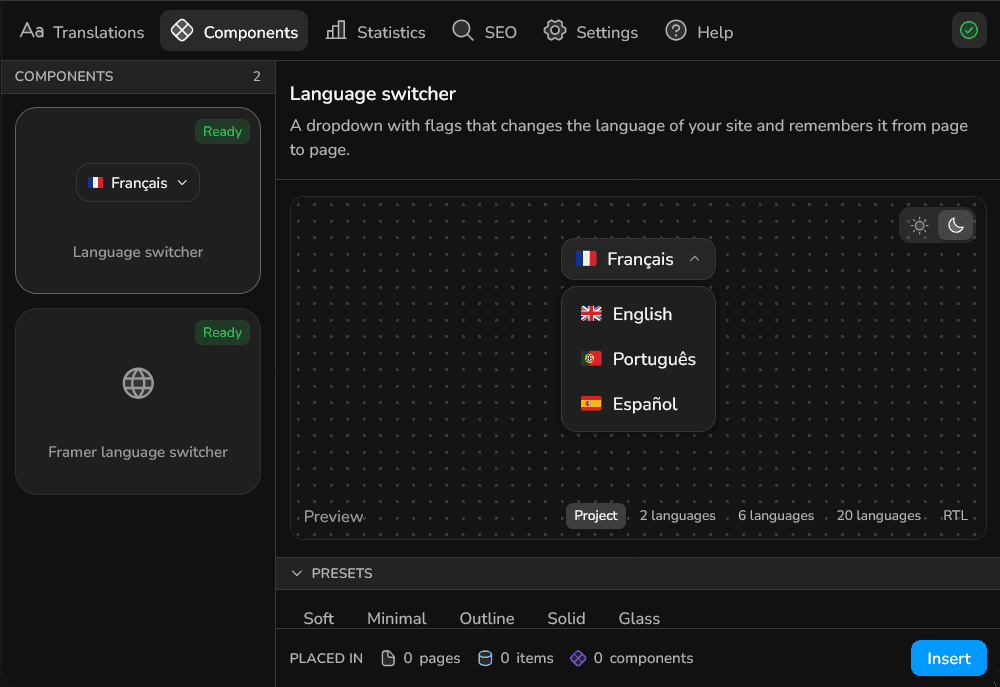
A switcher that matches your site
Style the ready-made switcher in the plugin, or let your own Framer dropdown fill itself with your languages.

Matches your brand, no code needed

Right-to-left languages included
A switcher that matches your site
Style the ready-made switcher in the plugin, or let your own Framer dropdown fill itself with your languages.
Matches your brand, no code needed
Right-to-left languages included
A switcher that matches your site
Style the ready-made switcher in the plugin, or let your own Framer dropdown fill itself with your languages.
Matches your brand, no code needed
Right-to-left languages included
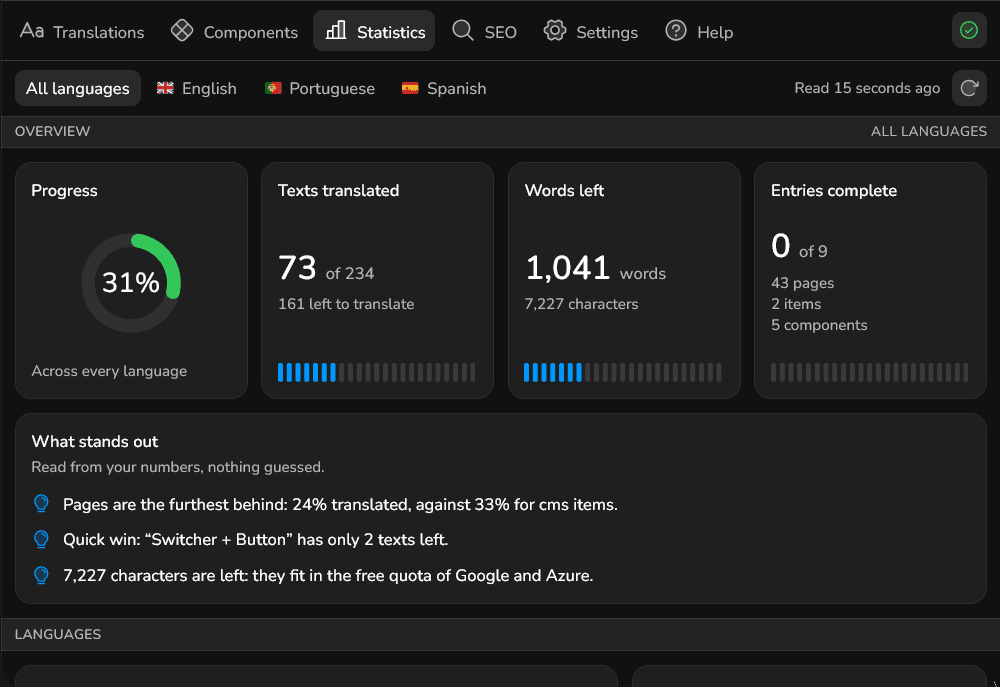
See exactly how much is translated
Progress by language, page and content type, so you know what is left before you publish.

Spot gaps at a glance

Jump straight to what needs work
See exactly how much is translated
Progress by language, page and content type, so you know what is left before you publish.
Spot gaps at a glance
Jump straight to what needs work
See exactly how much is translated
Progress by language, page and content type, so you know what is left before you publish.
Spot gaps at a glance
Jump straight to what needs work
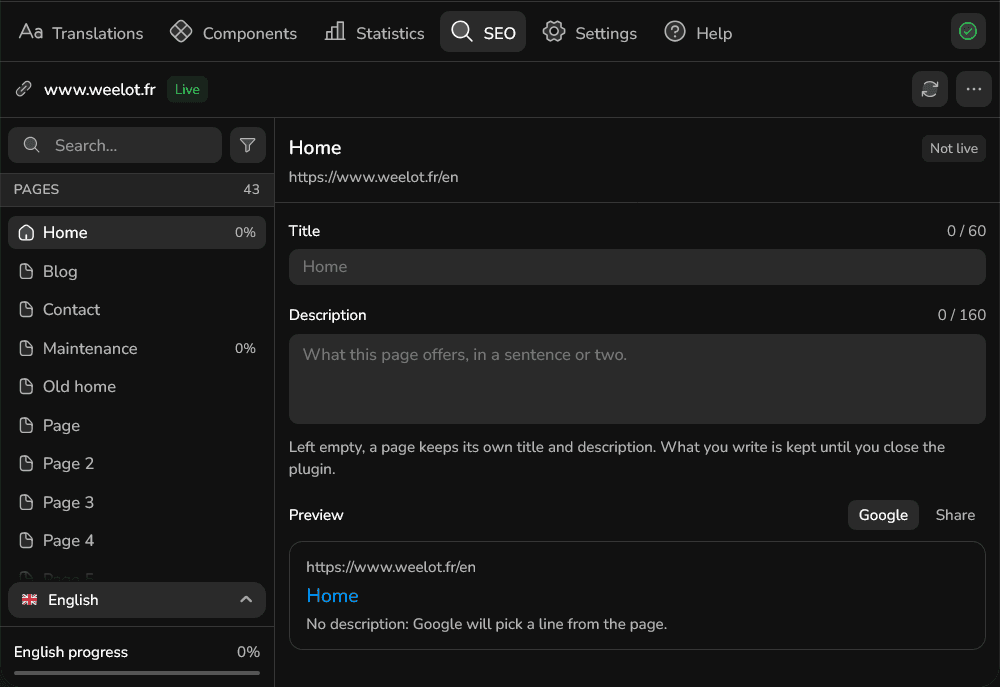
Every language on Google
With Plus, each language gets its own address on your domain, like /pt/about, with translated titles and descriptions.

Rank in every language you offer

Only finished pages go live
Every language on Google
With Plus, each language gets its own address on your domain, like /pt/about, with translated titles and descriptions.
Rank in every language you offer
Only finished pages go live
Every language on Google
With Plus, each language gets its own address on your domain, like /pt/about, with translated titles and descriptions.
Rank in every language you offer
Only finished pages go live
Go further
Go further
Bring your AI. Set your rules. Keep every translation.
Bring your AI. Set your rules.
Keep every translation.
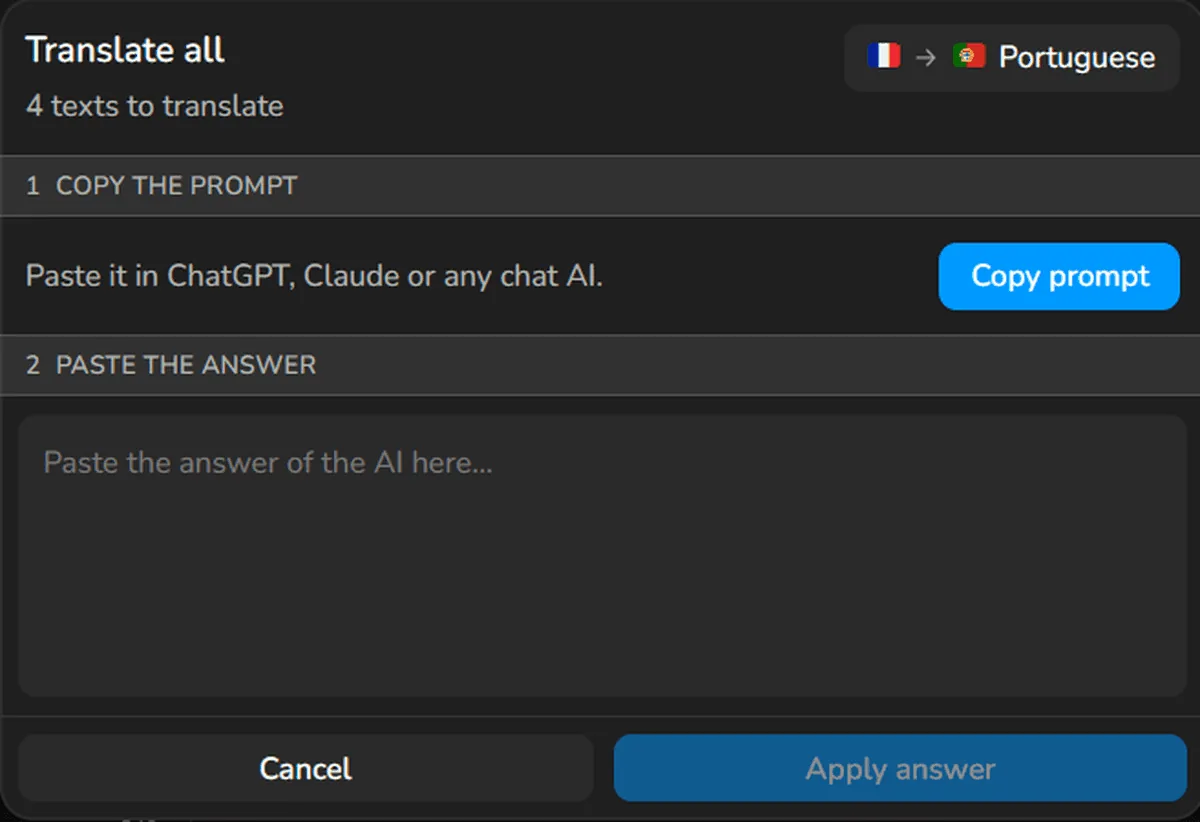

Translate with the AI you already use
Copy a ready-made prompt, paste it in ChatGPT, Claude or any chat AI, then paste the answer back. No API key, no extra subscription.
Translate with the AI you already use
Copy a ready-made prompt, paste it in ChatGPT, Claude or any chat AI, then paste the answer back. No API key, no extra subscription.
Translate with the AI you already use
Copy a ready-made prompt, paste it in ChatGPT, Claude or any chat AI, then paste the answer back. No API key, no extra subscription.
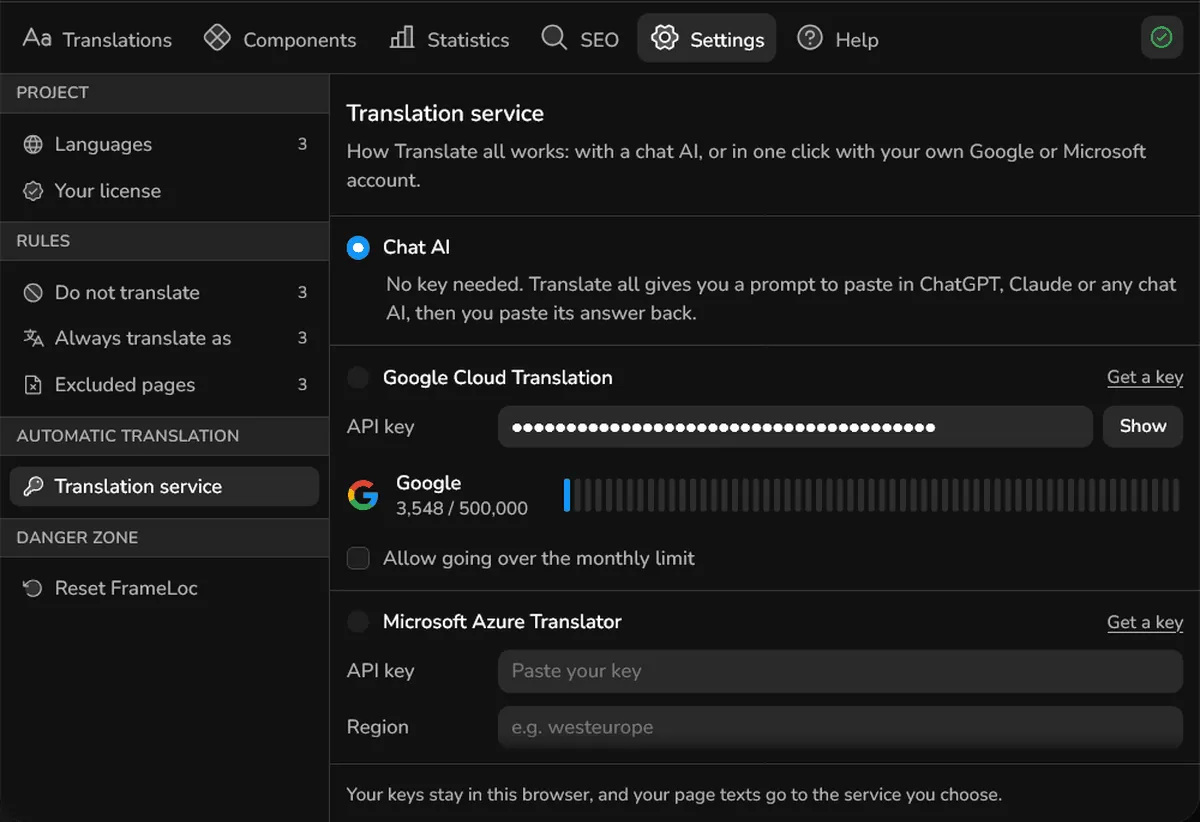

One click with Google or Azure
Add your own key and Translate all fills every missing text of the page. A usage bar tracks the free monthly quota, and your keys stay in your browser.
One click with Google or Azure
Add your own key and Translate all fills every missing text of the page. A usage bar tracks the free monthly quota, and your keys stay in your browser.
One click with Google or Azure
Add your own key and Translate all fills every missing text of the page. A usage bar tracks the free monthly quota, and your keys stay in your browser.
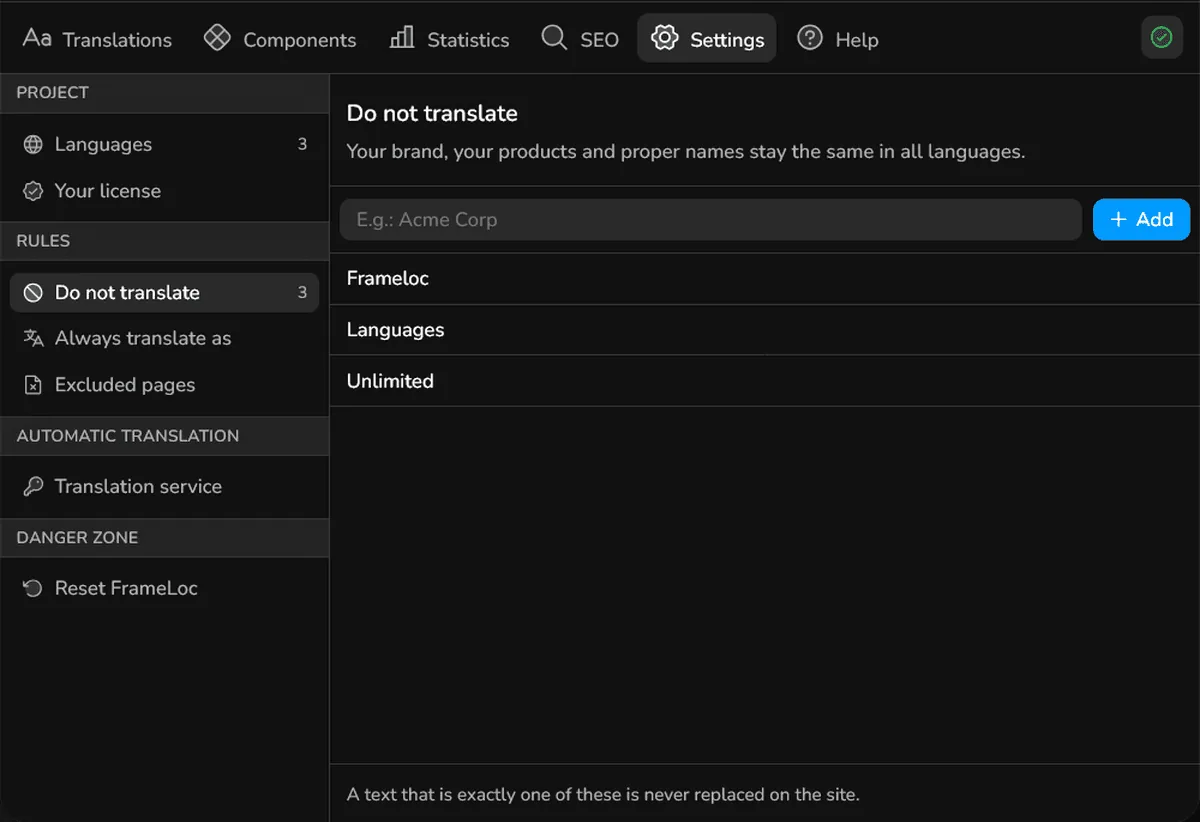

Rules that keep your brand intact
Keep names untouched, pin a term per language, or leave pages out. Rules apply live on your site.
Rules that keep your brand intact
Keep names untouched, pin a term per language, or leave pages out. Rules apply live on your site.
Rules that keep your brand intact
Keep names untouched, pin a term per language, or leave pages out. Rules apply live on your site.
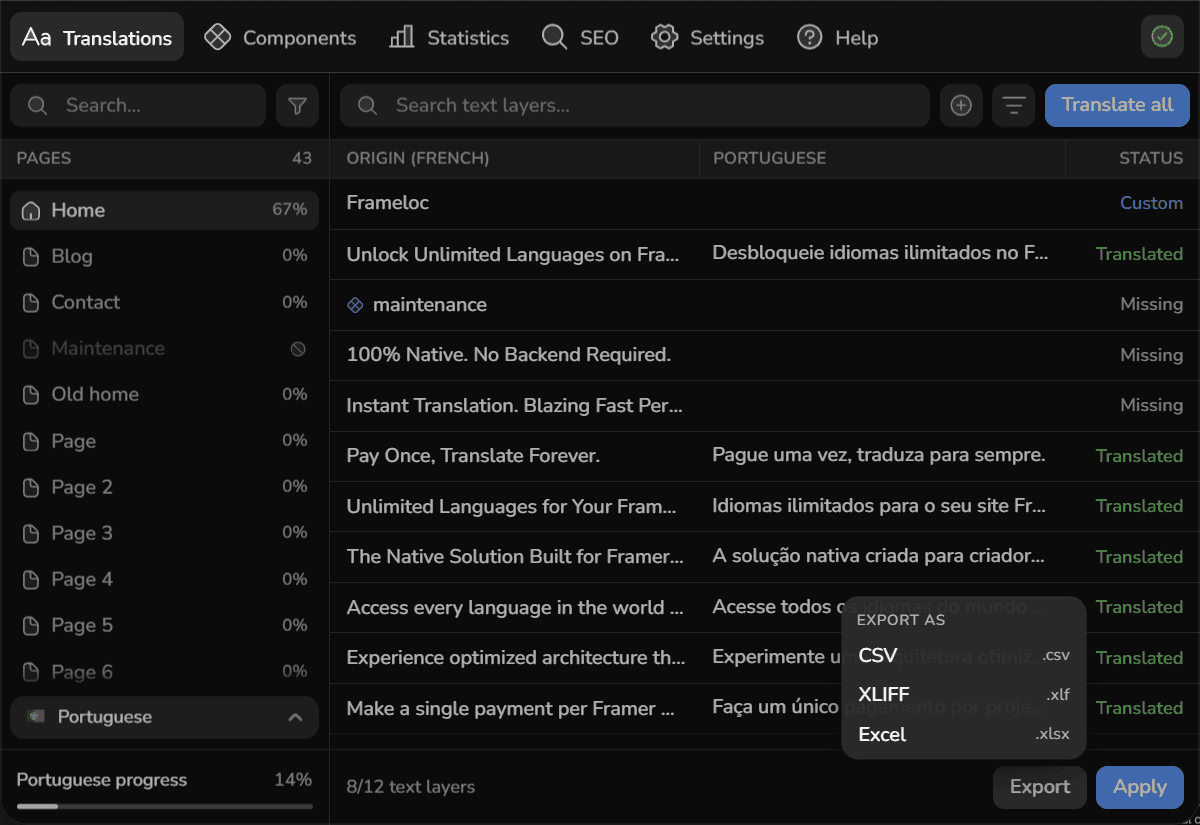
Translations that stay with you
Each translation lives in a code file in your Framer project. Export to CSV, XLIFF or Excel whenever you want.
Translations that stay with you
Each translation lives in a code file in your Framer project. Export to CSV, XLIFF or Excel whenever you want.
Translations that stay with you
Each translation lives in a code file in your Framer project. Export to CSV, XLIFF or Excel whenever you want.
Pricing
Pricing
Pay once, translate for good.
Pay once, translate for good.
BASIC
€49
€70
one-time
Everything except Advanced SEO.
Pages, CMS and components
Chat AI or Google/Azure key
Language switcher included
Translations in your project
Stats, export and rules
Right-to-left languages
14-day refund, VAT included
Add or hide languages
BASIC UNLIMITED
UNBOUND
€249
€400
one-time
Basic for every project, paid once.
Everything in Basic
All your Framer projects
No project limit
One Framer account
No Advanced SEO
Right-to-left languages
14-day refund, VAT included
Add or hide languages
PLUS
ADVANCED SEO
€79
€79
€79
€120
€79 per license
€79 per license
You save €41 (−34%)
Everything in Basic
Language URLs on Google
Translated titles and meta
hreflang for each language
Pack discounts from 3
Who it is for
Who it is for
Built for freelancers and agencies.
Built for freelancers and agencies.
Freelancers
Agencies
Product sites
Deliver multilingual sites faster
Translate a client site inside the Framer project you built it in. No export round trip, no agency in the middle, and the client can fix a word themselves.
Chat AI or your own key, no per-word fees.
Export to CSV or XLIFF for a translator.
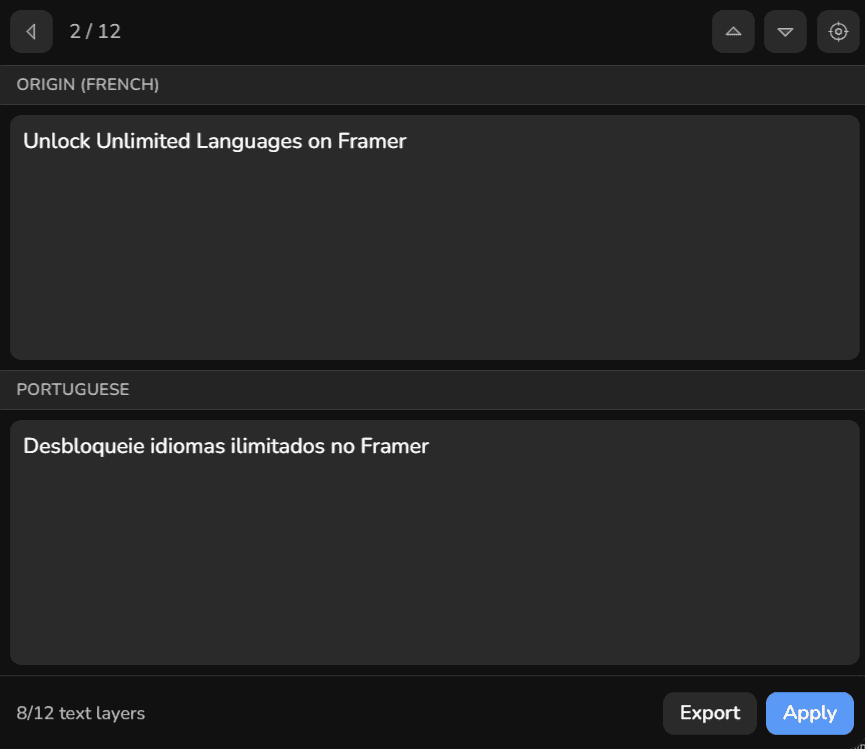
Review every text side by side in one editor.
Freelancers
Agencies
Product sites

Deliver multilingual sites faster
Translate a client site inside the Framer project you built it in. No export round trip, no agency in the middle, and the client can fix a word themselves.
Chat AI or your own key, no per-word fees.
Export to CSV or XLIFF for a translator.
Review every text side by side in one editor.
Freelancers
Agencies
Product sites
Deliver multilingual sites faster
Translate a client site inside the Framer project you built it in. No export round trip, no agency in the middle, and the client can fix a word themselves.
Chat AI or your own key, no per-word fees.
Export to CSV or XLIFF for a translator.
Review every text side by side in one editor.
How it works
Six steps from first text to live language.
Step 1
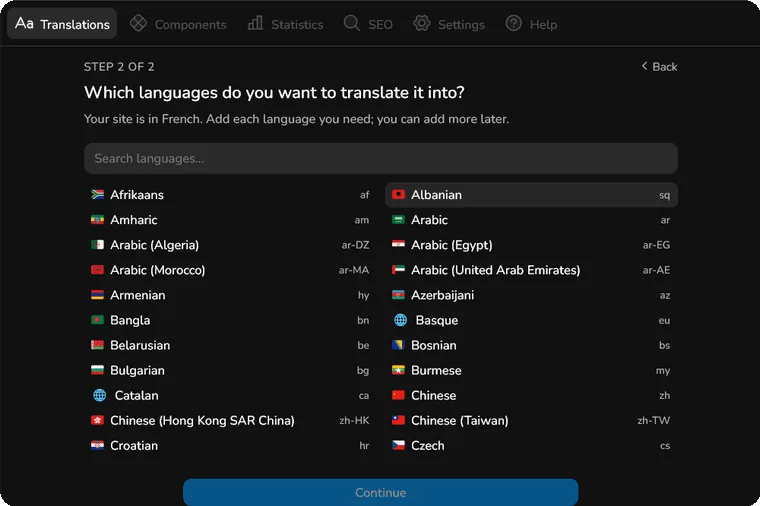
Choose your languages
Pick the language your site is written in and the ones you translate into. Add more whenever a new market opens.
Step 1
Choose your languages
Pick the language your site is written in and the ones you translate into. Add more whenever a new market opens.
Step 2
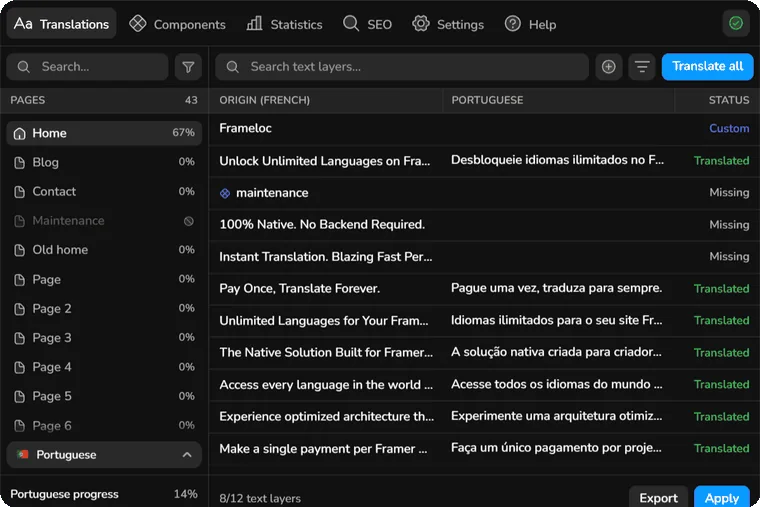
Read every text
Open any page, CMS item or component. Each text is read from your project and listed in one editor.
Step 2
Read every text
Open any page, CMS item or component. Each text is read from your project and listed in one editor.
Step 3
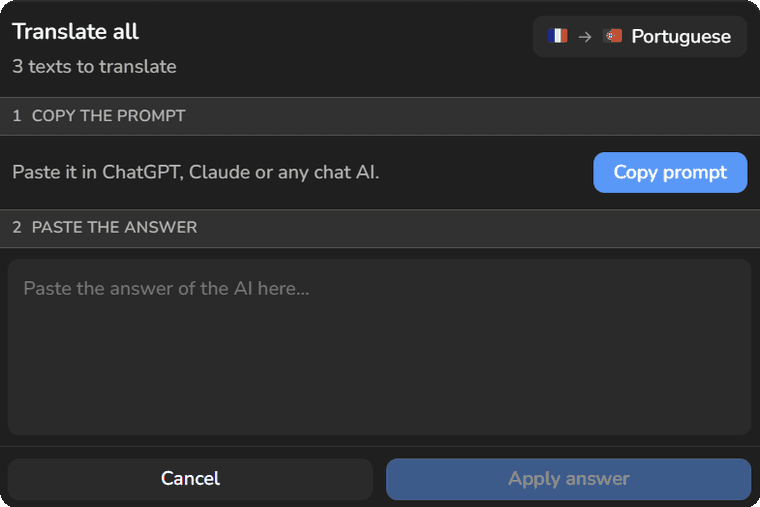
Translate in one click
Paste your chat AI's answer, or let Google or Azure translate the whole page. Fix anything by hand.
Step 3
Translate in one click
Paste your chat AI's answer, or let Google or Azure translate the whole page. Fix anything by hand.
Step 4
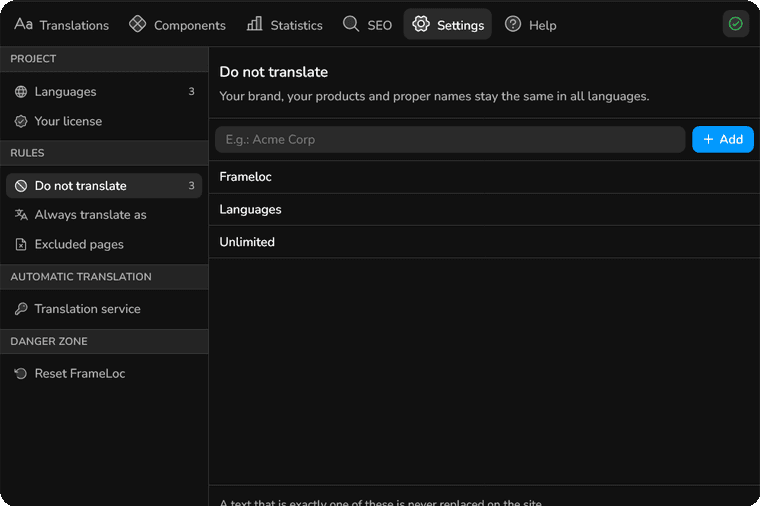
Set your rules
Keep brand names as they are, pin your own terms for each language, and leave some pages out.
Step 4
Set your rules
Keep brand names as they are, pin your own terms for each language, and leave some pages out.
Step 5
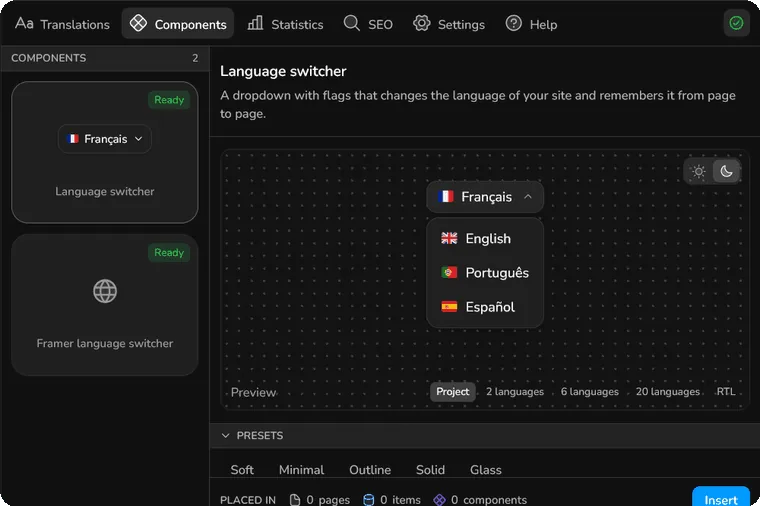
Add the switcher
Style the ready-made language switcher in the plugin, or fill your own Framer dropdown, then place it in your menu.
Step 5
Add the switcher
Style the ready-made language switcher in the plugin, or fill your own Framer dropdown, then place it in your menu.
Step 6
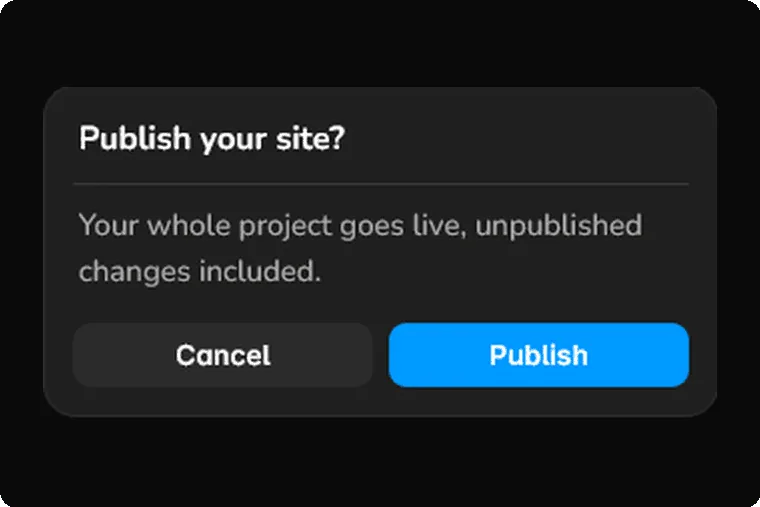
Apply and publish
One click installs the script, puts every language on your site and publishes it once you confirm.
Step 6
Apply and publish
One click installs the script, puts every language on your site and publishes it once you confirm.
Built for Framer
Fast for visitors. Simple for you.
A tiny script
About 6 KB, and it loads only the translation files of the page being viewed.
The right language, automatically
A ?lang= link first, then the visitor's saved choice, then their browser language.
Works with Framer's navigation
It follows page changes inside the site and picks up content added after the page loads.
Right-to-left, handled
Arabic, Hebrew and other right-to-left languages flip the page direction. Check your layout once.
Over 100 languages and variants
Choose from more than 100 languages and regional variants such as fr-CA or pt-BR, each with its flag.
Why FrameLoc
Other ways to localize cost more or do less.
Other ways to localize cost more or do less.
Compare FrameLoc with the alternatives
Same job, fewer compromises.
FrameLoc
Lantis
Page Translator
OwOsy Translate
Framer
Statistics and progress by language


SEO: URL per language and hreflang
Rules: do not translate, fixed terms
Translations stored in your project
Price
€49
€3/mo per language
€29 once
$9 to $29/mo
$20/mo per language
Export to CSV, XLIFF and Excel
Pricing model
One-time
Subscription
One-time
Subscription
Subscription
Pages added to your Framer project
No page added
Not listed
A page copy per language
Not listed
No page added
Any language, variants and right-to-left
Compare FrameLoc with the alternatives
Same job, fewer compromises.
Statistics and progress by language
SEO: URL per language and hreflang
Rules: do not translate, fixed terms
Translations stored in your project
Price
€49
Export to CSV, XLIFF and Excel
Pricing model
One-time
Pages added to your Framer project
No page added
Any language, variants and right-to-left
Lantis
Page Translator
FrameLoc
OwOsy Translate
Framer
Compare FrameLoc with the alternatives
Same job, fewer compromises.
FrameLoc
Lantis
Page Translator
OwOsy Translate
Framer
Statistics and progress by language
SEO: URL per language and hreflang
Rules: do not translate, fixed terms
Translations stored in your project
Price
€49
€3/mo per language
€29 once
$9 to $29/mo
$20/mo per language
Export to CSV, XLIFF and Excel
Pricing model
One-time
Subscription
One-time
Subscription
Subscription
Pages added to your Framer project
No page added
Not listed
A page copy per language
Not listed
No page added
Any language, variants and right-to-left
FAQ
FAQ
You have questions.
We have answers.
You have questions.
We have answers.
How is FrameLoc different from Framer Localization?
Framer Localization costs $20 per language per month. FrameLoc is a one-time payment and keeps translations in your project as code files.
Does FrameLoc add pages to my project?
No. Translations are code files under FrameLoc/DATA in your project, one per page, CMS item or component, and a small script on your site swaps the texts. FrameLoc never adds pages or Framer locales, and your texts are never sent to a FrameLoc server. If you stop, your translations stay in your project and can be exported to CSV, XLIFF or Excel.
Which translation methods can I use?
Paste the answer of any chat AI such as ChatGPT or Claude, no key needed. Or connect your own Google Cloud Translation or Microsoft Azure Translator key to translate a whole page in one click. Keys stay in your browser, and you can edit every text by hand. DeepL is not supported.
What can FrameLoc translate?
Pages, CMS items (text, rich text, options and lists), design components and the text of code components. Code component text is read from its source, so very dynamic text may be missed.
Can I keep brand names untranslated?
Yes. Mark texts as Do not translate, pin a term to a fixed translation for each language, or exclude whole pages by path or pattern. Your rules apply live on your site.
What does Plus add?
Advanced SEO: every language on its own URL on your domain, like /pt/about, with translated titles and descriptions.
Does one license cover several projects?
A Basic or Plus license covers one project and everyone on it. Basic Unlimited covers every project of your Framer account.
Which languages can I add?
More than 100 languages and regional variants, such as fr-CA or pt-BR, each with its flag. Right-to-left languages like Arabic and Hebrew flip the page direction, so check your layout once. You can hide or delete a language at any time.
Will Google index my translations?
With Basic, texts are translated in the visitor's browser, so search engines see your original language. Plus gives every language its own URL on your domain, like /pt/about, with translated titles, descriptions and hreflang.
Can I get a refund?
Yes, within 14 days of purchase if FrameLoc does not work or does not fit your project, as long as you have not published translations to your site. The refund policy has the details.
Your site, in every language.
Buy FrameLoc once, translate in Framer, and publish every language in one click.